Camps can now open their space to the community and burners can submit events directly through the dust app or https://dust.events.
Open Your Stage to the Community
Whether you run an open workshop space, a center camp stage, or a sound camp with open lineups, public event submissions let you hand the mic to your fellow burners. Camp leads can enable submissions with a few taps, set a schedule, and choose how long each slot is. The rest is handled automatically, including making sure times chosen do not overlap with other events.
How It Works
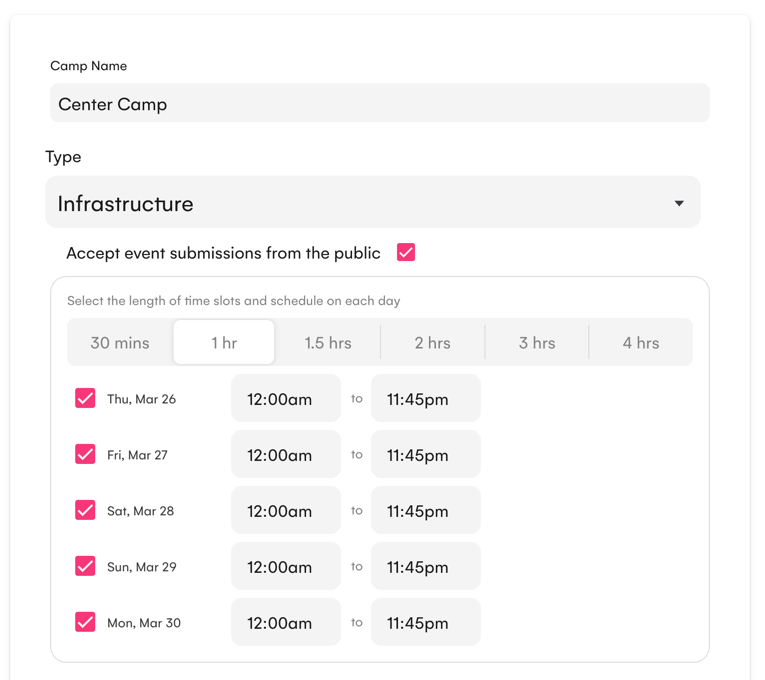
Camp leads enable public submissions from the camp's Edit screen by checking Accept Event submissions from the public. From there you configure a schedule (one block per day your space is available) and choose a slot duration. The schedule is divided into consecutive slots and presents them to attendees when they go to submit an event.
When someone submits, they fill in the usual event details (title, description, event type) and pick their time. The submission goes into the same organizer review queue as any other event, so nothing goes live without the Burns approval.
Duration Options
Duration for time slots can be fixed or you can let the event submitter:
- Any — No fixed slot length. Attendees use the standard date/time picker and can choose any start and end time. The system still blocks overlapping submissions, so two events can't occupy the same time.
- 30 mins / 1 hr / 1.5 hrs / 2 hrs / 3 hrs / 4 hrs — Attendees choose from a list of pre-divided slots for their selected day. Slots already claimed by another event are shown as unavailable, preventing double-booking automatically.
Use Any for a flexible open space. Use a fixed duration when your programming runs back-to-back same-length sessions — DJ sets, workshops, talks, and the like.
Getting Started
- Go to Camps and open your camp
- Click Edit
- Check Accept Event submissions from the public
- Add a schedule block for each day your space is open
- Choose a Duration
- Click Save
That's it. Attendees will immediately be able to submit events at your camp.
For full details, see the Public Event Submissions documentation.
We'd love to hear how camps use this — let us know what you think!